iHealth Track Review: Four Kinds of People Buy This Blood Pressure Monitor. One of Them Hates Apps.

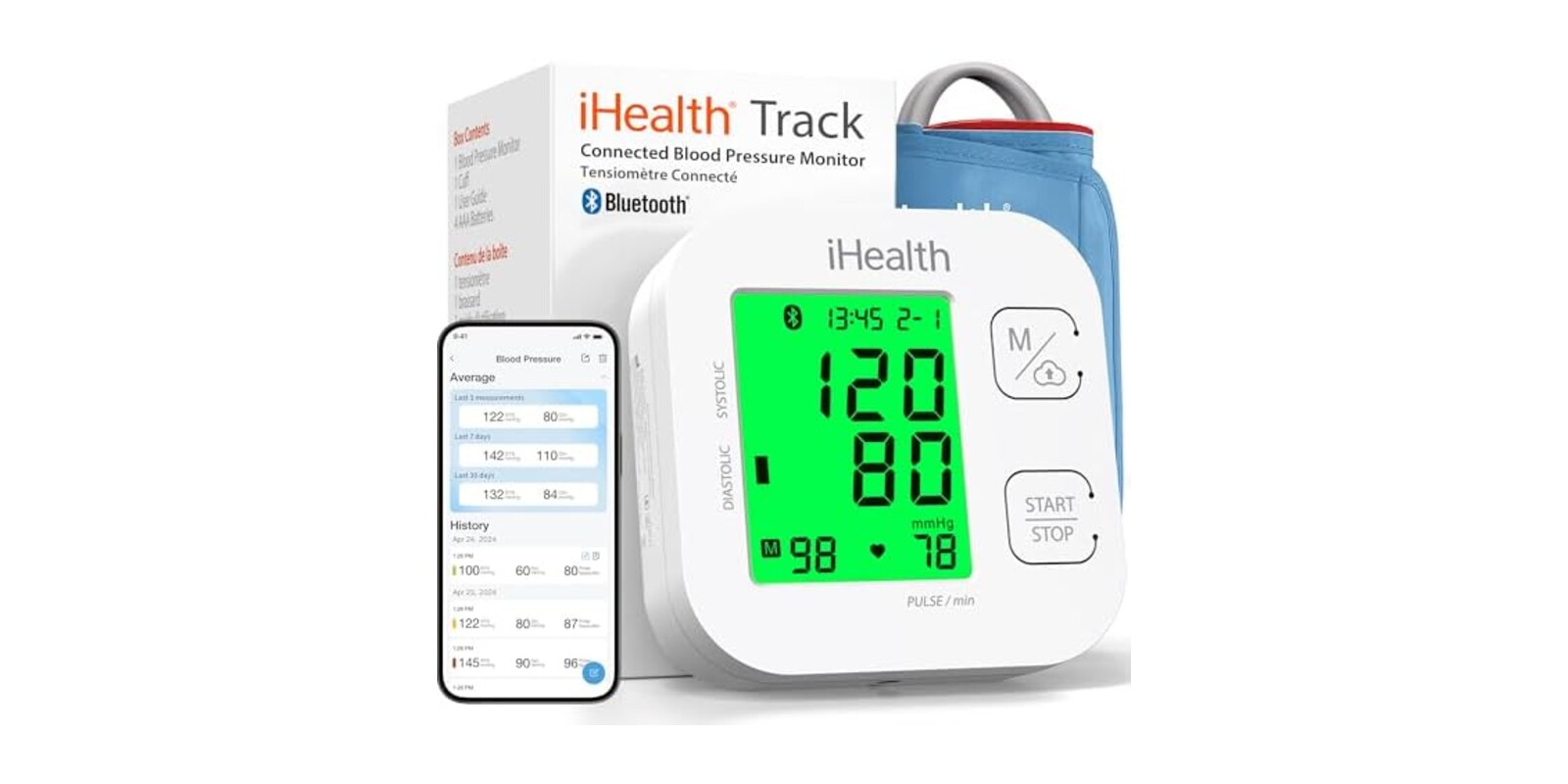
At some point the doctor stops saying "we'll keep an eye on it" and starts saying "I want you checking this at home." And suddenly you're standing in the pharmacy aisle, or scrolling Amazon at 10pm, trying to figure out which arm cuff won't lie to you, won't confuse you, and won't end up in a drawer by August.
The iHealth Track is one of the most-bought answers to that moment, and after digging through its review base, we think whether it's the right answer depends less on the cuff and more on which of four people you are. Find yourself in the table, then jump to your section.
| You are... | What you actually need |
| Under doctor's orders to track daily | A reading history you don't have to write down |
| Allergic to apps and pairing screens | One button, big numbers, done |
| Setting this up for a parent or spouse | Something they can't get wrong |
| A whole household sharing one cuff | A way to keep everyone's numbers straight |
Camp One: Your Doctor Said "Track It Daily"
This is the camp the Track was built for. You press the button, the cuff inflates, and the reading lands in iHealth's free phone app over Bluetooth. No notebook, no typing numbers into a spreadsheet, no "I think it was around 130 something" at your next appointment. The app keeps the full history and shows averages, and owners say it plays nicely with Apple Health, Google Fit, and Samsung Health. One reviewer put it plainly: because the app logs everything automatically, "it's clear you haven't invented anything" when you hand your doctor the record.
A detail we appreciated from the reviews: the app doesn't charge a subscription. You buy the cuff, the tracking is included. Given how many health gadgets now want a monthly fee for the graph, that's a genuine point in its favour.
Camp Two: You Just Want the Big Number
Maybe you don't want your blood pressure anywhere near your phone. Fine. The Track works completely standalone. The display is large and bright with oversized digits that reviewers (many of them older, many buying for older relatives) consistently call easy to read. The device itself stores up to 99 readings, so there's still a history on board even if you never open the app.
The part app-averse buyers end up loving most is the colour cue. The screen glows a different colour depending on where your reading falls, and it flashes red on a very high one. You don't need to remember what the numbers mean in the moment. The screen tells you whether this is a "carry on with your day" reading or a "mention this to your doctor" reading.
Camp Three: You're Buying It for Mum or Dad
A lot of this review base is people buying for someone else. A wife buying for her larger-framed husband (the wide cuff fit him comfortably, she reports). A son setting it up after a parent's surgery. For that job, the Track's strengths line up well: one button to take a reading, big digits, and that red flashing screen that acts as a visual alarm even for someone who'd never look at an app.
If you're the one doing remote duty, pair the cuff with their phone, and the history builds itself for you to review when you visit or call. Just be realistic about your role here. You'll likely be the one doing the Bluetooth setup, and possibly re-doing it (more on that below).
Camp Four: One Cuff, Several Arms
Households sharing a single monitor get a partial win. Because readings sit on the device and can be selected individually for syncing, more than one person can use the same cuff. The catch is bookkeeping: the device doesn't know whose arm it was on. Owners doing this say you have to keep track of who took which reading and when, and a couple of them wish the system stored separate profiles per person. It works, but it's manual.
The Honest Caveats
Two things to know before you buy. First, the Bluetooth isn't bulletproof. Most owners pair it once and forget it, but a minority report the cuff connecting to the app only intermittently and readings failing to save. If the app is your whole reason for buying, know that a small slice of the review base had a bad time with it. Second, some owners find their readings sit slightly off from the cuff at their doctor's office. Consistently off, in the same direction, which is manageable, but off.
The second point deserves the fuller story, because one reviewer handled it exactly the way we'd suggest:
"I did compare it to my doctor's office cuff (took it to my appointment and had the nurse use her cuff and then switch to mine) and it was off a little, but the doctor said to just account for the same difference every time I use it."
Plenty of other owners report the opposite, readings landing close to what their doctor's equipment showed. The honest summary is that this thing measures consistently, and consistency is what home tracking is for. It shows you the trend. It doesn't replace the person who interprets it.
Smaller gripes from the reviews: it runs strictly on AAA batteries with no wall-plug option, and there's no travel or storage case in the box (though one owner notes the original packaging stores it fine, and the first set of batteries is included).
💡 Warm Corners tip: take the cuff to your next appointment and ask the nurse to do a back-to-back comparison, her equipment then yours. Ten minutes, and you'll know your personal offset for good. Owners also mention taking two readings in a row at home; they usually land close together, which is a quick sanity check that the cuff is behaving.
Is This the Right Blood Pressure Monitor for You?
You'll love it if you are...
- 🩺 Someone whose doctor asked for a home log and who wants it kept automatically, not in a notebook
- 📵 An app skeptic who wants one button, huge digits, and a screen that changes colour so the reading explains itself
- 👨👩👧 The family member setting up monitoring for a parent or spouse who won't fiddle with technology
- 📱 Already in the Apple Health, Google Fit, or Samsung Health ecosystem and want readings flowing in without a subscription fee
Skip it if you need...
- Separate user profiles on the device itself, because shared use means manually tracking whose reading is whose
- A wall-powered unit, since this runs on AAA batteries only
- Rock-solid app syncing as a hard requirement, because a minority of owners report flaky Bluetooth and lost readings
- A carrying case included, as there isn't one
Review Base at a Glance
4.5 stars across 64,356 ratings. That's not a promising early signal, that's a verdict from a crowd the size of a small city, gathered over years of daily squeezing. At that volume, a product with a real accuracy or reliability problem gets found out and dragged under 4 stars fast. The praise clusters around ease of use, the readable display, and the free app's history keeping, while the complaints cluster around Bluetooth hiccups and the occasional offset versus a doctor's cuff. In other words, the caveats above are the known caveats. There isn't much lurking beyond them.
As an Amazon Associate I earn from qualifying purchases. This comes at no extra cost to you.
You should also read:
Tapo C104 Security Camera: Which Camp Are You In Before You Buy This
If you're...Jump to Watching a garage, dog, or general outdoor spotWhat You're Actually Getting Relying specifically on baby cry or precise people detectionThe Honest Caveat, first The Tapo C104 is an IP65 indoor/outdoor camera with 1080p video, color night vision, and free person/motion/baby cry detection…
Continue reading...Pilates Essentials Kit: Which Camp Are You In Before You Buy This
If you're...Read this Already following a Pilates routine online or from a classWhat You're Actually Getting A complete beginner who's never touched a resistance bandThe Honest Caveat, first The Pilates essentials kit is a 15-piece bundle covering most of the equipment you'd want for home…
Continue reading...Solar Motion Sensor Lights: Your Questions Answered Before You Mount Them
The asterisk up front: these are bright, wide-coverage solar lights with one recurring weak point, the mounting hardware. If you're handy with a drill and don't mind swapping out a bracket screw, that's a minor annoyance. If you wanted a true set-and-forget install, read the…
Continue reading...